What you need
- A Windows 10 or 11 PC (64-bit).
- A clean legal copy of GTA V, Legacy edition: Legacy, not Enhanced. A copy from Steam, the Epic Games Store or the Rockstar Games Launcher works. On Steam, Legacy is a separate game in your library; in Epic and the Rockstar Games Launcher install and run Legacy as well. FiveM does not work with Enhanced, and pirated copies won't do. Start the game once and wait for the main menu.
- FiveM. The free client for servers, only from the official site fivem.net. Install it and run it once: it finds the game by itself.
- The COLDZ launcher: optional, but the easiest way: download the launcher. Without it, use the server address
92.118.11.28:28683. - A microphone if you want one. Voice works while you hold a key: see chat, voice and combat.
How to join
With the COLDZ Launcher
The easiest way. The launcher does not replace FiveM: it starts it and connects it straight to COLDZ.
- Download the launcher and install it. No admin rights needed. If Windows says "Unknown publisher", click "More info", then "Run anyway".
- The launcher finds FiveM by itself. If FiveM is missing, it gives you a link to fivem.net and notices FiveM as soon as you install it.
- Type your name into the "Nickname" field. That is the name people see in chat, in the player list and above your head. Leave it empty to use your FiveM name. You can change it any time; the new name applies from your next join.
- Press "Play" once and wait: FiveM opens and connects to the server by itself. No need to press it again.
The launcher also shows the server status, players online, your ping, the news and the rules. It updates itself with the "Update" button.
Manually through FiveM
Open FiveM, find COLDZ in the server list and connect. Or press F8 and type connect 92.118.11.28:28683 (the launcher has the address too, with a "Copy" button). In that case your name comes from the FiveM settings.
Your first join
The first time, FiveM downloads several gigabytes of server files while the loading screen shows the rules and tips. Then the world around you loads, which takes up to a minute and a half. FiveM keeps what it downloaded, so later joins are faster.
Next comes the main menu: a camera slowly flies along snowed-in streets. There is no sign-up: your character is created automatically with your name.
| Button | What it does |
|---|---|
| Play | enter the world |
| Appearance | face, hair, eyebrows, beard, eyes. Only here: there is no editor in game |
| Introduction | 7 short pages about the game, also in F2 → "Help" → "How to play" |
| Settings | language, graphics, inventory key, sound, screen |
| Rules, Support | the server rules and how to reach an admin |
This is also where you pick "Male" or "Female". A new or dead character comes out as the chosen gender, a living one stays as they were. Clothes come with your skin; a vest and helmet from the inventory go on top.
On your very first join a "First time here" window pops up. Press "Set up" and sort out your keys, screen, sound and language right away.
Where you spawn and what you carry
You come to on the coast, at least 65 m from other players. You carry survivor clothes, 2 bandages and a glass shard. Your blood is full (12,000), your temperature is 37 °C, and you are neither hungry nor thirsty.
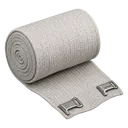 BandageStops bleeding.0.2 kg
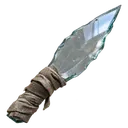 Glass shardTakes no space. Don't like your spawn point? Die and spawn again. Your items stay in the corpse.0 kg
- The glass shard takes no space. Don't like your spawn point? Use it to die and spawn somewhere else. Your gear stays in the body.
- Log out alive and next time you appear in the same spot.
- Without a backpack you have 12 slots.
- There is no clock, compass, map or minimap on screen until you find a watch, a compass, a map and a GPS.
Your first hour: a checklist
- Search the nearest houses. Gear lies where people dropped it: in houses, farms, warehouses and military bases. Walk up and press I: this key opens your inventory and everything nearby (you can switch it to Tab or J in F2). More in loot.
- Find a backpack. Even a knapsack doubles your space: +12 slots. All of them are in backpacks.
- Water and food. Hunger and thirst grow as you move, and an empty bar drains blood. Fill bottles and flasks in water, at fountains, hydrants or sinks. More in food and water.
- Bandages and meds. Bandages stop bleeding, morphine fixes broken legs, a medkit pulls out shrapnel. A fall from a height breaks your legs. More in blood.
- Warmth. You freeze faster standing still and stay warmer on the move. A fire of firewood and matches, a house, a car with the engine running, hot tea and heat packs keep you warm. A blizzard comes every 6 hours: without a parka, find shelter. More in cold.
- Watch, compass, map, GPS. Without them you see no time, no directions, no map and no minimap.
- Keep it quiet. Running and gunshots carry far. Crouch (Ctrl) or lie down (Z) to be harder to spot. More in noise and stealth and zombies.
- Careful with people. There are no safe zones. A stranger may become a friend or shoot you in the back. Bring your friends into a clan: F2 → "Clan", up to 20 people. More in clans.
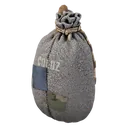 Knapsack+12 slots: 24 in total.2 kg
 Bottle of waterThirst to full and 100 blood. Refill the empty bottle at a pond, fountain, hydrant or sink.0.5 kg
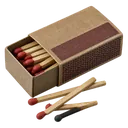 MatchesLight a campfire with firewood.0 kg
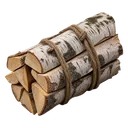 FirewoodLight a campfire with matches.2 kg
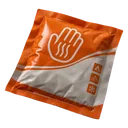 Heat packWarms you up at once and cures a cold.0.5 kg
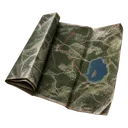 MapOpens the big map.0 kg
Death
The death screen shows the cause, how long you lived and how many zombies and players you killed. Your next life starts in 5 seconds.
- Sleeping bag. If you laid out a bag, the death screen lets you choose "Wake up in the bag" or "Random place". You have 30 seconds to decide. A bag works once every 2 hours.
- Your gear. Everything you carried stays in your body for 2 hours. Anyone can search it, you included, if you make it back in time. Worn clothes stay on the body: they come off through the menu at the body.
- Short life. If you lived less than a minute, there is no body and your gear is gone.
- Your next life starts with the same kit: survivor clothes, 2 bandages, a glass shard.
- What you keep: tents and bags on the map, your clan, your base, your points and the "All time" stats in F2.